Gitメモ : Git RadarでPROMPTにリポジトリの状態を表示
Git Radar
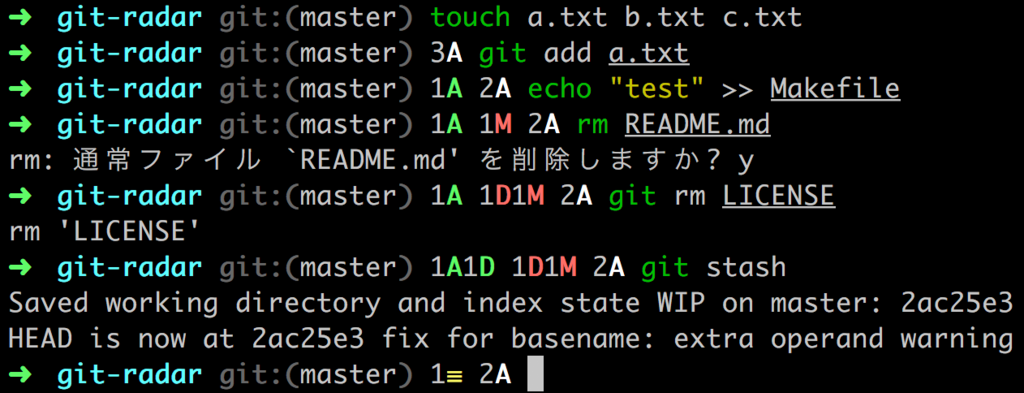
Git Radarを使うと図のようにPROMPTにリポジトリの状態を表示できるので試してみる。
インストール
以下のようにリポジトリをcloneしてPATHに追加する。
$ cd ~ && git clone https://github.com/michaeldfallen/git-radar .git-radar
$ echo 'export PATH=$PATH:$HOME/.git-radar' >> ~/.zshrc
macOSの場合はbrewでインストールできる。
$ brew install michaeldfallen/formula/git-radar
インストールが成功していればgit-radarコマンドで使い方を確認できる。
$ git-radar
git-radar - a heads up display for git

examples:
  git:(master)                  # You are on the master branch and everything is clean
  git:(upstream ⚡ my-branch)    # Fresh branch that we haven't pushed upstream
  git:(my-branch) 2A            # Two files created that aren't tracked by git
  git:(my-branch) 1A 3M         # 1 new file staged to commit and 3 modifications that we still need to `git add`
  git:(𝘮 2 → my-branch 3↑)      # 3 commits made locally ready to push up while master is ahead of us by 2
  git:(𝘮 2 ⇄ 3 my-branch)       # our commits pushed up, master and my-branch have diverged
  git:(detached@94eac67) 2T3U   # mid rebase, we are detached and have 3 conflicts caused by US and 2 caused by THEM
  git:(𝘮 2 ⇄ 3 my-branch 3⇵5)   # rebase complete, our rewritten commits now need pushed up
  git:(𝘮 ← 3 my-branch)         # origin/my-branch is up to date with master and has our 3 commits waiting merge
  git:(master) 3≡               # You have 3 stashes stored

usage:
  git-radar [--zsh|--bash|--fish] [--fetch]

  --fetch  # Fetches your repo asynchronously in the background every 5 mins
  --zsh    # Output prompt using Zsh style color characters
  --bash   # Output prompt using Bash style color characters
  --fish   # Output prompt using fish style color characters

Bash example:
  export PS1="\W\$(git-radar --bash --fetch) "

  This will show your current directory and the full git-radar.
  As an added benefit, if you are in a repo, it will asynchronously
  run `git fetch` every 5 mins, so that you are never out of date.

Zsh example:
  export PROMPT="%1/%\$(git-radar --zsh --fetch) "

  Same as the Bash but for Zsh.

fish example:
  function fish_prompt
    set_color $fish_color_cwd
    echo -n (prompt_pwd)
    git-radar --fish -fetch
    set_color normal
    echo -n ' > '
  end

  Same as the Bash but for fish.
設定例はREADMEにも書いてあり、シェルに応じてPROMPTの設定をすればよい。
Zshを使っているので.zshrcに下記行を追加して設定は完了。
export PROMPT="$PROMPT\$(git-radar --zsh --fetch) "
使い方
インストールと設定が完了していれば、リポジトリの状態に応じてPROMPTに図のような情報が表示される(詳細はREADME参照)。
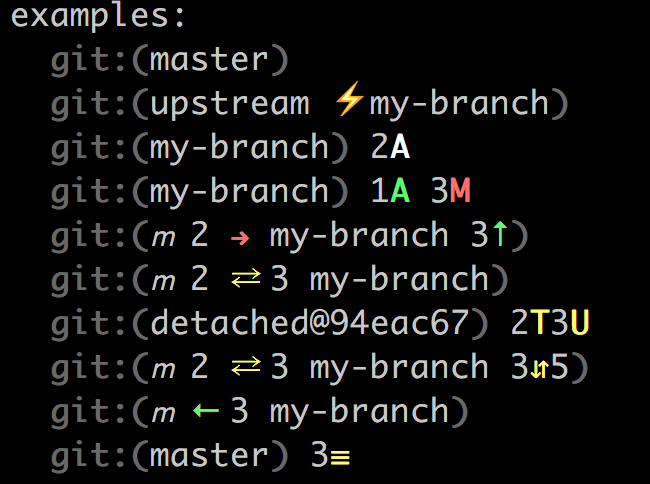
数字(ファイル数)の後に表示されるシンボルと色の意味は下記表を参照。コンフリクトの例についてはテストファイルにテストケースが書いてある。
| シンボル | 意味 |
|---|---|
| A | 追加したファイル |
| D | 削除したファイル |
| M | 編集したファイル |
| R | リネームしたファイル |
| C | コピーしたファイル |
| U | コンフリクトファイル(caused by Us) |
| T | コンフリクトファイル(caused by Them) |
| B | コンフリクトファイル(caused by Both us and them) |
| 色 | 意味 |
|---|---|
| 緑 | ステージング |
| 赤 | アンステージング |
| 灰 | 未追跡 |
| 黄 | コンフリクト |
設定で--fetchというオプションを指定しているが、このオプションを指定するとバックグラウンドでgit fetchを非同期に実行して最新状態にしているようだ。
デフォルトでは5分毎に実行する設定になっているので、変更したい場合は以下のような設定をzshrcに追加する(下記例は30秒毎)。
export GIT_RADAR_FETCH_TIME=30
